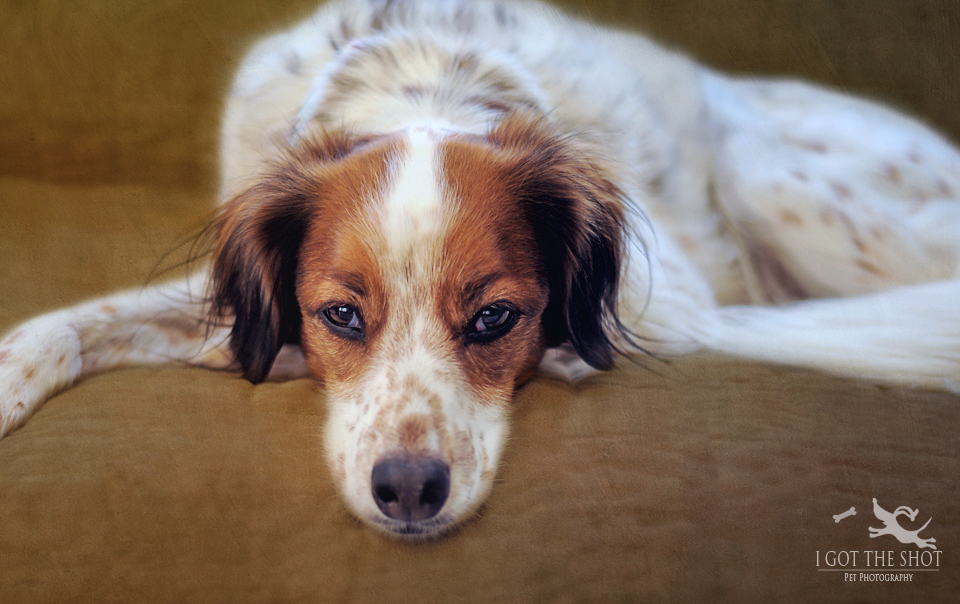
This week's project 52 theme is Texture, and my model is Bethy. We didn't set out to do a complicated shot. I wanted it to be very simple. You can't get any simpler than Bethy doing what she loves--taking a nap on a rainy afternoon on the couch. That is if she can find a free spot.
I use textures quite a bit. I am not talking about the natural textures that you find in a dog's coat or the grass or a sidewalk. I am referring to overlay textures. They almost become a necessity for me when I am photographing shelter cats, as the area I work in does not have lighting designed for photographic ambiance, and the cats are typically out of their cages for a small amount of time and up against a cinderblock-type wall. I will typically clean up that wall in post-process and apply a nice texture that works well with both the cat's fur color and lighting.
This is where going through some tutorials on applying overlays and texture may be helpful. You do need an editing program. There are many places online where you can find good textures for use in photo work. Many of them are compatible with Adobe editing programs.
One of my favorites is Radiant Texture by Portrait Pizzazz. There is a fee associated with the purchase of these textures, but there are places where you can find free textures to download. Another great texture guru is Kim Klassen. Kim develops her own textures. If you sign up for her mailing list, Kim has a Texture Tuesday event where she sends you a free texture for download. I like to use Kim's soft textures for my work with children.
Back to Bethy. The cover over our couch is not exciting. As a backdrop it deserves a D-. I thought Bethy looked particularly serene on this day hiding away from the rain outside, and if I had asked her to move while I removed the cover, we would have lost the moment, so I snapped the photo. I knew immediately it was a candidate for a texture application. I chose a Radiant Texture called Pebbled Warm and applied it at 60% opacity. It helped to give more texture to our drab couch cover, and added some definition to Bethy's face and ears.
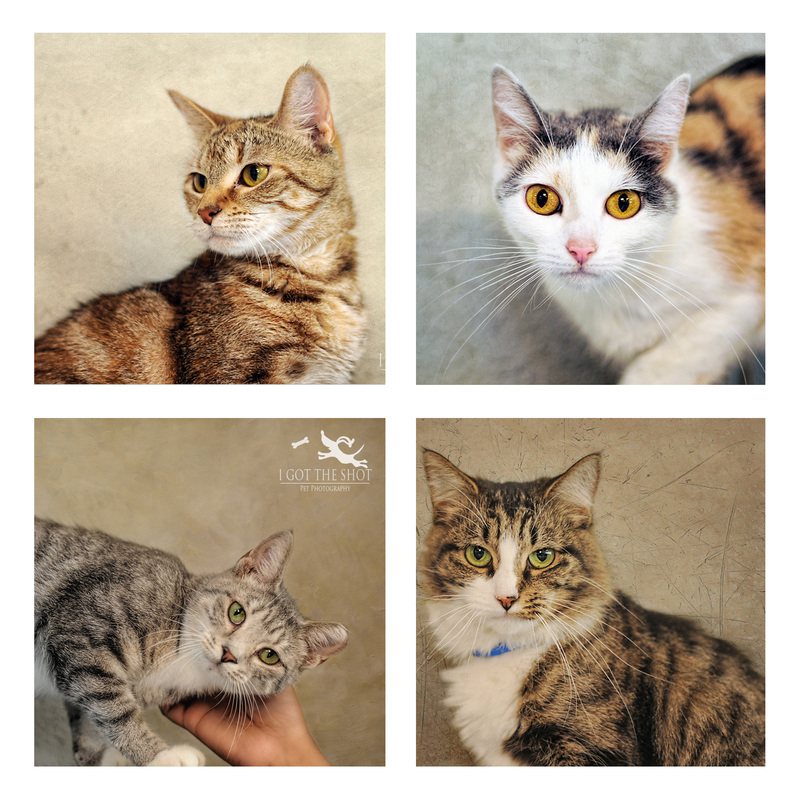
Below are some examples of recent photos I've done of shelter kitties using texture. Now hit the blog circle starting with Cincinnati pet photographer, Suzi Pix Photography, to see more interpretations of the texture theme.
I use textures quite a bit. I am not talking about the natural textures that you find in a dog's coat or the grass or a sidewalk. I am referring to overlay textures. They almost become a necessity for me when I am photographing shelter cats, as the area I work in does not have lighting designed for photographic ambiance, and the cats are typically out of their cages for a small amount of time and up against a cinderblock-type wall. I will typically clean up that wall in post-process and apply a nice texture that works well with both the cat's fur color and lighting.
This is where going through some tutorials on applying overlays and texture may be helpful. You do need an editing program. There are many places online where you can find good textures for use in photo work. Many of them are compatible with Adobe editing programs.
One of my favorites is Radiant Texture by Portrait Pizzazz. There is a fee associated with the purchase of these textures, but there are places where you can find free textures to download. Another great texture guru is Kim Klassen. Kim develops her own textures. If you sign up for her mailing list, Kim has a Texture Tuesday event where she sends you a free texture for download. I like to use Kim's soft textures for my work with children.
Back to Bethy. The cover over our couch is not exciting. As a backdrop it deserves a D-. I thought Bethy looked particularly serene on this day hiding away from the rain outside, and if I had asked her to move while I removed the cover, we would have lost the moment, so I snapped the photo. I knew immediately it was a candidate for a texture application. I chose a Radiant Texture called Pebbled Warm and applied it at 60% opacity. It helped to give more texture to our drab couch cover, and added some definition to Bethy's face and ears.
Below are some examples of recent photos I've done of shelter kitties using texture. Now hit the blog circle starting with Cincinnati pet photographer, Suzi Pix Photography, to see more interpretations of the texture theme.
 RSS Feed